Microsoft Azure Data Factory Tutorial
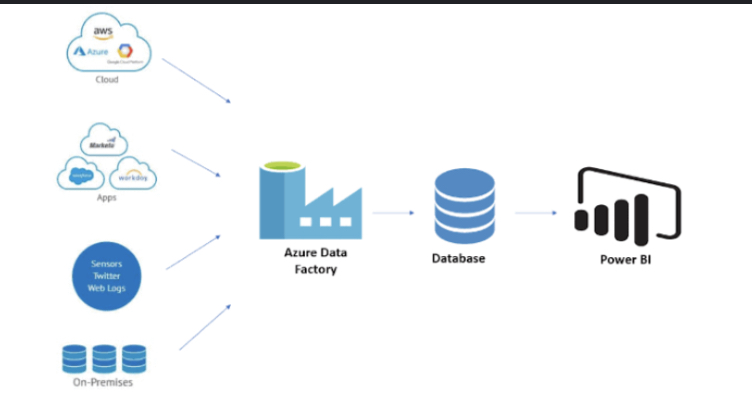
To integrate data in the cloud in a completely managed & serverless fashion, Azure Data Factory is the way to go. It allows businesses to construct data-driven workflows for the transformation, orchestration, and automation of data migration between specified data stores.
The platform makes it simple to create reliable and reusable data pipelines. These pipelines collect information from many sources, cleanse it, and put it into your data warehouses & storage so that you can perform analytics and generate reports afterward. You can see how far along the data migration process is, and how well it’s running, to obtain alerts if there are any problems.
Contents
Introduction
In today’s era of big data & cloud computing, organisations need effective data integration if they are to draw useful conclusions from their many data stores. As a powerful and flexible cloud-based data integration tool, Microsoft Azure Data Factory (ADF) allows for the smooth orchestration & automation of data activities. This lesson is an all-inclusive resource for learning about and putting Azure Data Factory to work for you. Readers will go on a trip to learn how ADF, with its fundamental concepts to its sophisticated methodologies, enables businesses to effectively ingest, convert, and transport data across different systems and applications. This course gives you the tools you need to maximise the significance of your data and create data-driven success in your organisation, whether you’re a data engineer, designer, or business analyst.
What is Cloud Computing?
Cloud computing is a method of gaining access to many types of server infrastructure over an online network. Connecting to your provider of cloud services is as easy as using your laptop or mobile device with internet access. Serverless computation, virtual machines, storage, as well as other computing resources are all at your disposal once you’ve established a connection.
To put it simply, cloud service providers are the house hundreds of computers, storage systems, and other elements in their huge data centres. These data centres store vast amounts of data in safe environments. Users hook up to these data hubs to glean information and utilise it as needed. Users can make use of a wide range of features, such as the ability to receive alerts whenever they receive new messages through email or text messages over the cloud. The most attractive feature of cloud systems is that users pay just for the resources they consume.
Streaming media, machine learning, data analysis, backup, & storage are just a few of the many uses for cloud computing. An interesting aspect of cloud storage is that it is where Netflix keeps all of its media files. In addition, cloud computing facilitates software testing and development, software distribution automation, and weblog hosting.
If you’re looking for a Management, and Development of Applications, Then this Microsoft Azure Developer Associate Training platform is the best choice.

What Are the Benefits of Using Cloud Services?
Assume for a moment that you’ve got a brilliant concept for a game-changing app that has the potential to deliver an outstanding user experience & generate substantial revenue. The success of the app depends on its availability on the web, where users may discover it, try it out, and then tell others about how great it is. However, putting out an app on the web is more complicated than it looks.
The proper functioning of your solution depends on many factors, including servers, storage equipment, developers, dedicated networks, & app security. There are a lot of moving parts, which can cause issues.
Buying everything you need separately is a huge financial and logistical risk. To make sure your app is running smoothly, you’ll need a lot of money. So if the app doesn’t catch on, you’ll be out of money. However, if the app gets extremely popular, you may need to invest in extra infrastructure to handle the influx of new users, which could drive up prices once more. Cloud computing is a lifesaver in situations like this. It’s useful since it can store things securely and grow as needed.
What is Microsoft Azure?
Microsoft Azure is a cloud-based computing platform & management interface for Microsoft’s cloud services & resources. These tools and services allow you to store and modify your data as needed. You need only have access to the internet & the Azure portal to gain entry to these tools and services.
Important information about Azure:
- Its launch date of February 1, 2010, was well after that of its primary rival, AWS.
- The initial setup costs nothing, and the service is pay-as-you-go, so you just pay for the features you use.
- It’s interesting to note that 80% of Fortune 500 organisations rely on Azure for cloud computing requirements.
- Azure is compatible with many different languages & frameworks.
- Azure’s many server centres located in different parts of the world are a further advantage.
- Azure has the most data centres of any cloud platform, with 42 located in different parts of the world.
- A further 12 data centres are in the works for Azure, bringing the total soon-to-be-available to 54.
Tutorial Highlights
Azure is the best place to learn cloud management whether you’re just starting in your career or you’re a seasoned pro working throughout the world. Azure is a robust cloud management solution that enables the development of virtually any web-based programme. Learn the fundamentals of Azure as well as how to set up a development environment for developing your first app with the help of this guide. We hope that this course will serve as a springboard for your software development career and offer you some insight into the platform which will allow you to succeed.
Tutorial on Azure:
Lesson 1: Azure and its functionality
Microsoft Azure serves as a cloud computing platform which simplifies the development, deployment, and administration of software programs for enterprises. Web applications, cloud services, mobile applications, and artificial intelligence services are just some of the tools at your disposal. The Azure Blockchain Developer Portal & the Ethereum Development Kit are only two examples of the tools available to programmers.
Lesson 2: Learn about Azure Active Directory & its benefits
When it comes to implementing a cloud-based strategy, no company can do without Microsoft Azure Active Directory (AD). With Azure Active Directory, you can control everything from users to applications to services to files without leaving a single place. It provides a safe environment for authenticating users & controlling access, and it allows you to log in once and access multiple resources.
Lesson 3: The Complete Guide to Microsoft Azure Virtual Networks
Create and administer your private network in the cloud using Microsoft Azure Virtual Network (MAN), a robust and scalable cloud-based option. You can connect as many devices, programs, and servers as you like without having an impact on the general internet. In this article, we’ll go through the fundamentals of this novel virtual network solution and show you why it might be an excellent fit for your business.
Lesson 4: the fundamentals of the Azure Data Factory
Create, deploy, and handle data-driven apps quickly and easily with Azure Data Factory. It’s a one-stop shop for all your data management needs, including data warehousing, integration, analysis, science, big data, & machine learning. Your users will benefit from the platform’s single interface, which streamlines the procedure of integrating disparate data sources and makes it less difficult to provide insightful analytics and business intelligence.
How Does Azure Work, and What Are Its Different Services?
More than two hundred services, organised into 18 groups, are available in Azure. Computing, networking, storage, IoT, migration, mobile, analytics, containers, AI as well as other machine learning, integration, management tools, developer tools, security, databases, DevOps, media identification, and web services are all examples of these types of technologies. Let’s go down some of the most important Azure offerings by type:
- Virtual Machine
With this service, you may quickly and easily set up a virtual computer running Windows, Linux, or another operating system.
- Cloud Learning
Using this service, you can build cloud-based apps with the ability to scale. After an app is deployed to Azure, the cloud service takes care of anything in between, such as provisioning, load balancing, and safety checks.
- Fabric Service
When using service fabric, creating a microservice is a breeze. A microservice is a program that has other programs within it.
- Functions
Functions are the building blocks for programs in any language. The nicest aspect about using this type of service is that Azure will handle any necessary hardware needs for application development. Providing the code is all that is required.
Conclusion
Microsoft Azure is, without a doubt, the most popular cloud platform in terms of business adoption right now. And by 2020, Microsoft anticipates that Azure will generate more than $19 billion in revenue. As more companies use Azure, specialists in the platform will have more possibilities to put their skills to use.
So, if you want to make a living working with Azure, now is the time to do it. Having your feet wet in the Azure workforce begins with a certification. Learn all the ins and outs of Azure & ace the certification examinations with the help of the many online resources available for Azure training.
Author Bio
Meravath Raju is a Digital Marketer, and a passionate writer, who is working with MindMajix, a top global online training provider. He also holds in-depth knowledge of IT and demanding technologies such as Business Intelligence, Salesforce, Cybersecurity, Software Testing, QA, Data analytics, Project Management and ERP tools, etc.